Do you ever get the feeling that you wished you had not started something? Well that is me at the minute.
I setup this blog many years ago but have not been updating it regularly for a long time. This is the reason that there is no dates on the posts so visitors would not know when the last time it was updated! Sneaky eh?
I designed the theme myself (and before you say it, yes I know it is not that good) I am a poor designer and used a software program called artisteer theme designer. The lazy man in me said that it was about the content not the design so it did not matter too much. Also, my money sites were far more important so I did not bother.
Joining the Quick Start Challenge has brought out the guilty bit now and I have been inspired to get this blog back on track and, as well as following my progress, I wanted to reinvigorate the blog, giving it a more modern design and feel. Something clean and brightI was thinking.
Also, one of the QSC3 group suggested I should have a responsive theme and, of course she is right.
So, I started the search for a theme but this has led to no end of problems. Already the menu has gone askew and as the theme is so old I cant get it back. Also, the new themes I did not like. Another, QSC member sent me access to a great theme called Anew but on loading it the side bars are all out.
It is apparent that this is not a simple matter of activating a new theme but totally redoing a lot of the site to get it right.
That is why I am thinking I wish I had left it alone. I have thought of outsourcing the work but in the spirit of the quick start challenge I will do it myself over the week-end.
One thing that does come to mind is that you really need to finish what you start. This is the key to success.
John Lee Dumas of Entrpreneur on fire uses the acronym F.O.C.U.S
F – Focus
O – one
C – Course
U – Until
S – Success
The thing is there is so much going on in our lives this can be tough.
The Quick Start Challenge is a prime example. It is something i really want to do but there is so much else going on in my life that I was wondering whether to get involved.
The way I have found around it is to compartmentalise things. So, I have a number of things going on and I schedule them in and then focus on that one thing until I have run out of time or completed the task. That way, I seem to get more done that trying to setup the blog. Then call some customers, then check my email, then, then etc…
This has had a massive impact on my productivity and although I do not always stick to the plan, when i do it produces great results.
So the moral of the story is. Start something and finish it before doing something else.
Here is a video and a step by step guide to allowing comments on your blog.
If you use wordpress to build a traditional website or e-commerce store then for the bigger part you do not need to have comments activated. However, if you are setting up a conventional blog then it is a good idea to have comments on your site as the more interaction you get from your readers the better it is.
If you want to allow comments on your blog then the following video will show you how to do it in a few simple steps.
Go to Settings – Discussion
If you want to allow comments then tick the box
Select the comment must be manually approved
Add negative or spam keywords
Add a list of spammy keywords and swear words, You can search google for a list of spam words to add.
Choose if you want to use avatars and how you want them to appear.
Remember to “Save Changes” before leaving the page.
If you allow comments on the site then you can edit this on the page or post levell
Mouse over the Title and click on ‘Quick Edit’ then tick or untick the allow comments
You might want to allow comments on your posts or blog page but not on the ‘contact us’ and ‘privacy page’ etc.
The Quick Start Challenge (QSC) is starting soon and I have decided to join.
Working online can be a lonely place and I thought that this might help me focus on one project rather than the 500 running around in my brain and the group might help to keep me on the straight and narrow.
It will also be good to see if using this structured process will help make me more productive. The fact that I have a group to spur me on and also to compete against will, I think be good for me.
The idea of the quick start challenge is for everyone to follow a proven course to generate income within 30 days.
With my years of experience and knowledge, I should be able to walk it so I think I will be motivated to ensure that a total newbie does not do better then I do.
Working on your own with no one watching over your shoulder or not being answerable to anyone is not always a good thing especially for someone with ADD like me who can spend a lot of time on things that are not productive to profitable.
Watch this space, I will be updating it regularly with my progress and results.
Wish me luck with the 2015 Quick start Challenge. It started with the first webinar on the 6th July at 11.00 in the evening.
The first task is to setup a blog and post about this challenge. I do have an advantage in that I have already got this blog setup and it has been for a number of years. However, the last blog post was before this was last December!
The whole idea os to start to add regular, useful and informative posts.
Do you know what people are saying about you and your business?
Manage Your Online Reputation and stay ahead of the competition
Managing your online reputation is important. The power of the consumer is stronger than ever with the Internet. Consumers can damage you and your business’ reputation very easily with blogs, review sites, social sites like Facebook and even Twitter.
What happens when someone puts your business name into Google? Or Facebook?
If you don’t know it’s time you found out and discovered the traces of your business that people can see there.
What’s said about you and your business on the Web can affect you as well as your company, both positively and negatively.
Are you aware of the looming threats and reputation attacks on your business?
Are you managing your company’s online reputation?
You need to know what people see when they look for your company name online. And only through understanding your business’ online presence, you can then manage your company’s online presence with more certainty.
While sometimes a business deserves a bad rap, other times it is simply a case of misunderstanding. At any rate, as a local business owner, you will want to arm yourself with the necessary tools and strategies that will help you to protect your business reputation online. You can also discover your audience and market to them directly.
If you want to know how to track your presence and monitor your brand, then this practical guide is written for you.
Below are the 6 tools for your online reputation monitoring activities. Use each to search, locate and respond when necessary.
Google Alerts are email updates of the latest relevant Google results based on your choice of query or topic. You can subscribe to each alert through email and RSS. For RSS alerts, you can use RSS readers to view these alerts.
So how can you use Google alerts?
You can setup a comprehensive alert system to notify you of stories as they happen, keep watch on your industry and competitors, see who is writing about you or your company and also track your marketing campaigns. When you monitor and track the alerts, you may recognise bloggers and journalists who post regularly on your topic of interests.You can form better relationships with them then market to them directly.
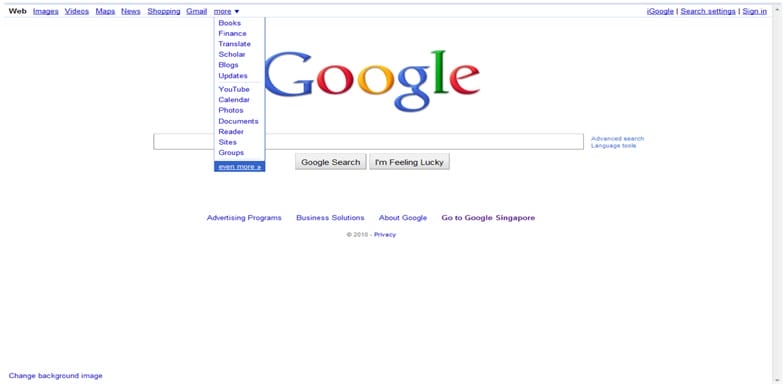
Step 1: Go to Google.com
Step 2: Click on ‘ More” on the top bar, select “even more >>”
Step 3: Select “Alerts”.
Step 4
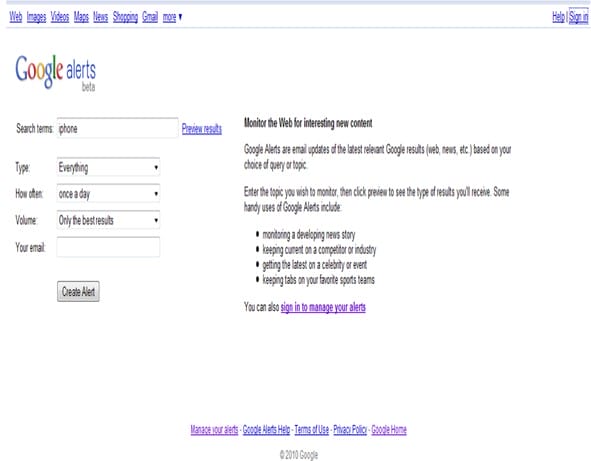
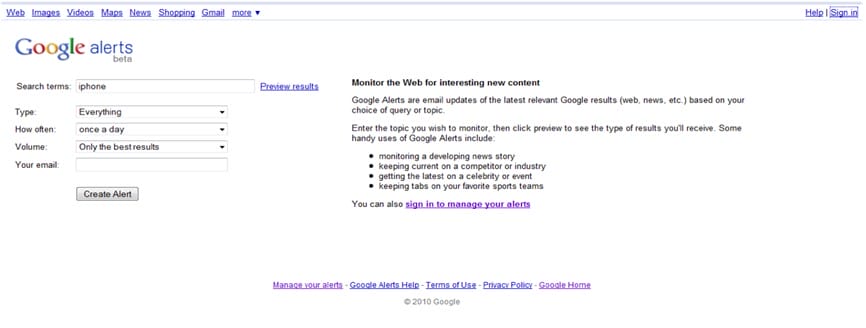
Inside ‘Google alerts’ you can set your alerts by specifying the following:
Search Terms– which is the words you want to search
Type – You can select the types of updates, it can be from “ Everything” ( which means all the following: News, Blogs, Updates, Video, Discussion), or alternatively, you can select one of the following:
“News” “Blogs” “Updates” ”Video” “Discussion”
How Often – You can decide how often you wish to receive the update
Volume – You can select ‘ only the best result’ or ‘ any results’
Email – You can enter your email address
Step 5
After you have completed entering all the information and your email, click ‘Sign in’ on the top right hand corner. Note: It is important for you to set up a ‘Gmail Account’ first before you sign in.
Step 6
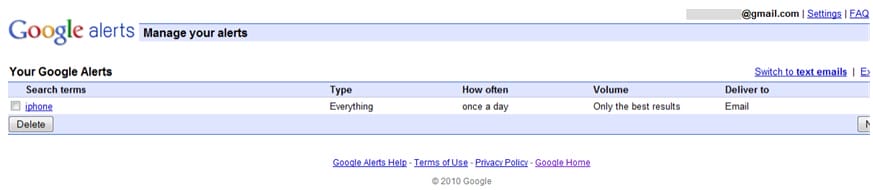
After signing in to Google alerts with your Google account:
To see the updates on your search term ‘iPhone’;
Click sign out from “Google Alerts”,
Next, log on to your Google account to check the updates relating to iPhone.
Step 7
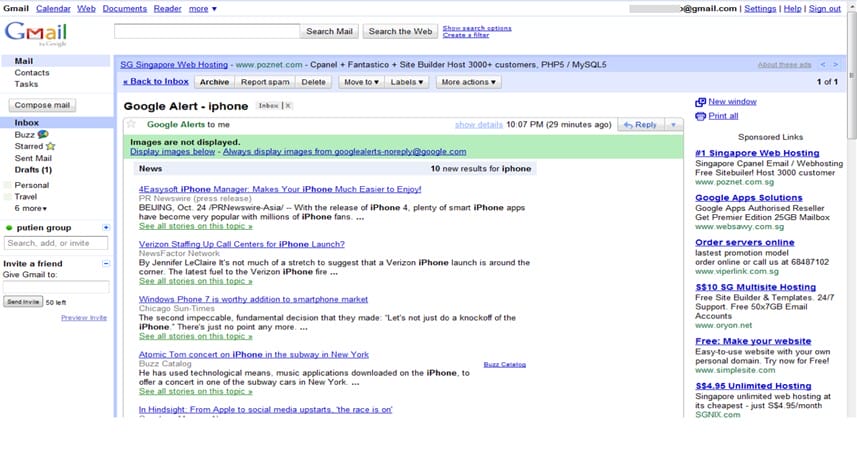
View the updates in your email relating to your search term: ‘iPhone’.
Technorati is the largest blog search engine in the world. If you have a blog, you can register it with Technorati to track “blog reactions” as well as find blogs that link to yours.
So how can you use Technorati?
Simply search for your name on Technorati, and subscribe to RSS alerts so that when someone blogs about you, you will find out. Take note of every blog that is linking to your blog as well so that when you write your next post, link back to these blogs. It is a way to show your appreciation and give the recognition to those who have recognised your blog.
Step 1
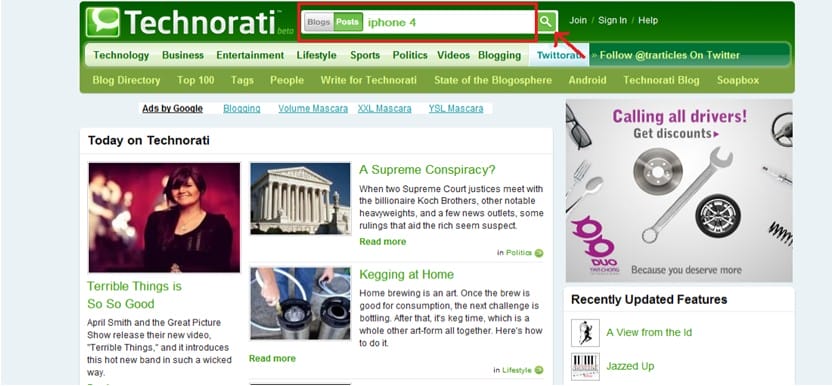
Type your search term in the search box.
In our example, it is ‘iphone 4’ and click on the green icon next to it (see arrow in the image below).
Step 2
An image showing the result of a list of blog posts related to the search term is shown below.
Click on the RSS feed icon
Step 3
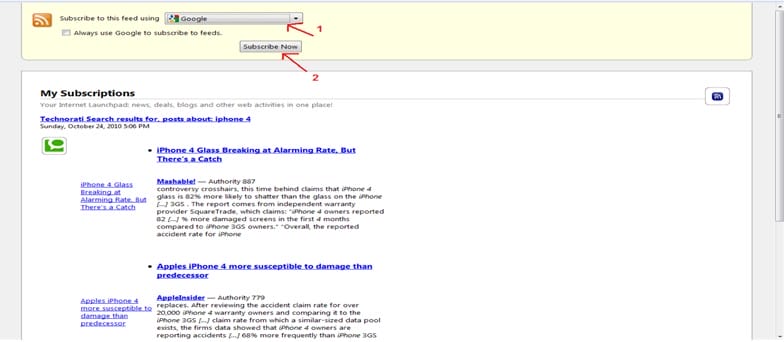
Select channel to view your RSS feeds (arrow “1” in the image) and then click ‘ Subscribe Now” (arrow “2” in the image).
Step 4
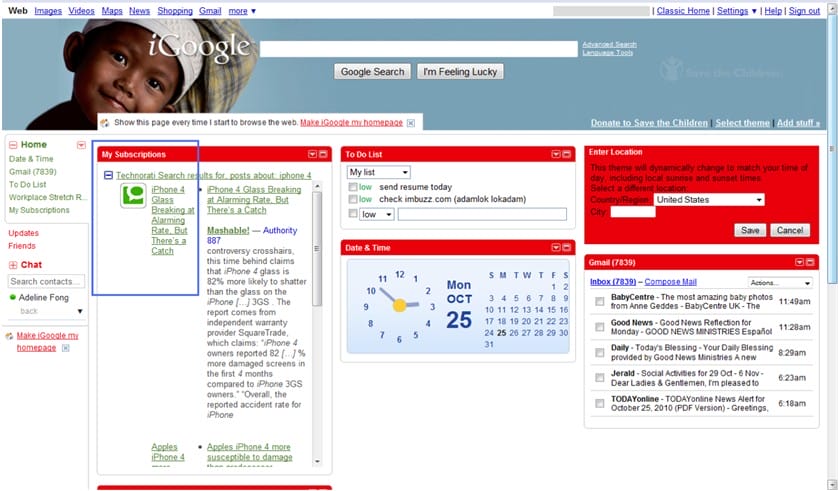
If you select ‘Google HomePage’ , it will direct you to Google.
You will see updates on the blog post you subscribe that is related to your search term.
Step 5
If you select Google Homepage,
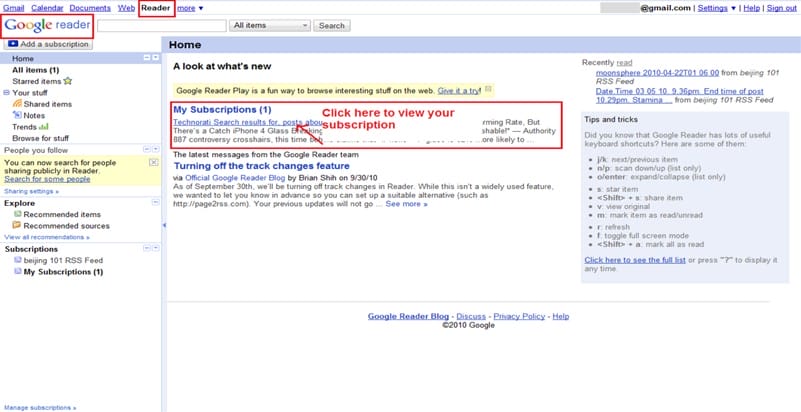
Alternatively, you can view the updates from Google Reader (see image below)
Note: You will need to have a Google Gmail account. Visit www.gmail.com to sign up for an account.
Step 6
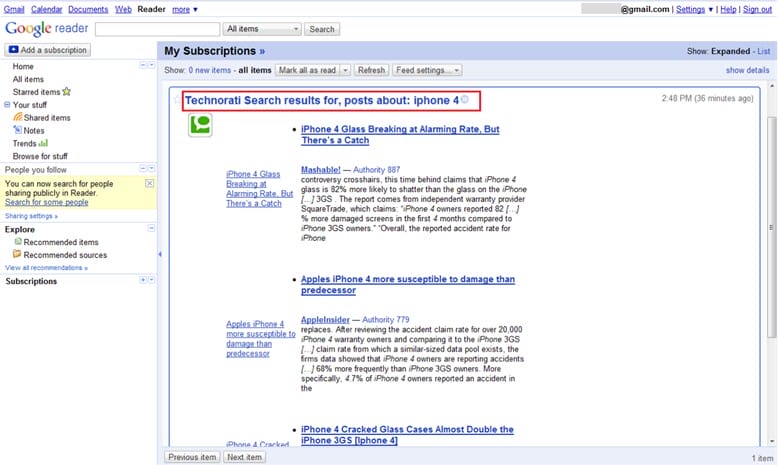
After clicking on the link (as shown above), it will direct you to the subscription page.
Backtype provides blog comments monitoring service. It lets you find, follow, and share comments from across the Web. If you only track posts, you will miss out comments on you on a series of blogs. This is where Backtype can help when it comes to monitoring.
So how can you use Backtype?
There are some blogs that you should be reading and follow diligently in your topic area. You can discover influencers who are commenting on these blogs and establish a list of key influencers. Then you can follow their comments from blog to blog and leave your own comment after theirs. This way, you can help build your brand because you may be perceived to have some association with them. Also, whenever you write a comment with a link to your Web site, BackType attributes it to you. You can therefore remind yourself where you commented and continue conversations that you started previously when you have time.
Step 1
Sign up for an account in Backtype.com.
Step 2
Upon login, you will see the dashboard below. Click on ‘Setup Alerts’ to receive updates on your search query.
Step 3
You can ‘create an alert’ by keying in your search terms and how often you wish to receive the updates.
Forums and discussion or message boards are another channel where people can gather in a community and talk about you or your company. Do not disregard discussion boards because they can be influential in swaying prospective customers’ views especially if they have very active communities.
So how can you use BoardTracker?
You can use BoardTracker to get instant alerts from threads citing your business name. Simply find all boards that are related to your business subject matter and join the top 5, based on the amount of conversations, the volume of registered users and the web traffic information which you can get from Alexa.com. Once you have identified the communities, join them and contribute by starting threads. Always leave your name and company URL at the end of each post.
Step 1
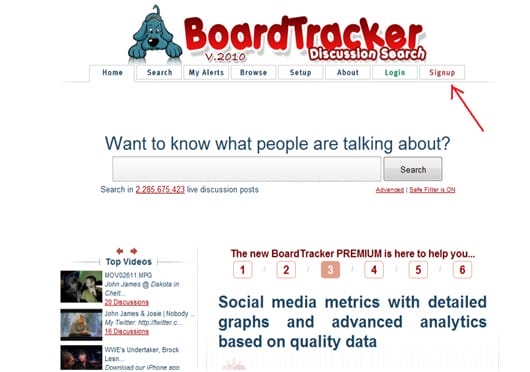
Visit www.boardtracker.com to track discussion forums related to your search terms.
Click ‘Signup’ to receive alerts on your search terms (see arrow on the image below).
Submit your name and email address to receive alerts.
Step 2
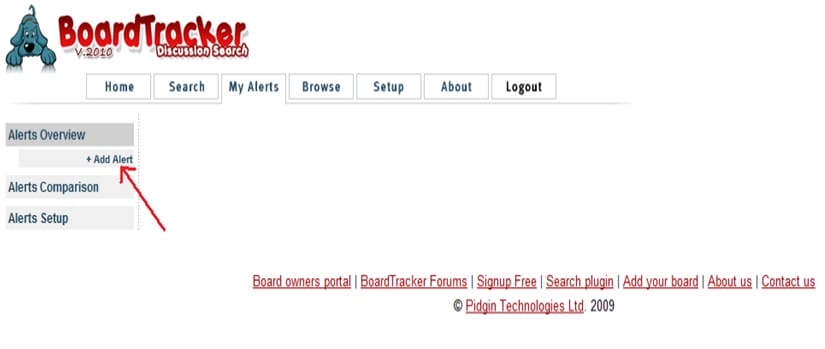
Under the ‘My Alerts’ tab, you can key in the search term you wish to subscribe.
Click on ‘ Add Alert’ (see arrow)
Step 3
After you click ‘ Add Alert’, you will see the following page below: It is under the ‘Set up’ tab.
Indicate the word you wish to search for under ‘Query’ and indicate your subscription preference such as the format you wish to receive and the frequencies.
Under My alert, OP s only: you can search for the search term made by the ‘Original Posters (OP s)’ who is the person who started the post Ops and replies: you can search for your search term made by the Original Poster as well as the replies made by other people with regard to the post Thread 1st Match– You can only search for your search term on post o
Step 4
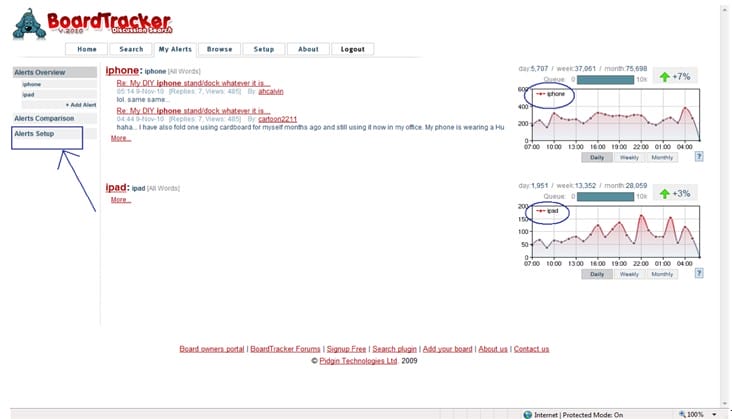
Click on ‘ My Alerts’ tab and click on ‘ Alerts Overview’ to see the search query, you will see the following:
Step 5
To make changes to your search term in ‘My Alerts’, click on ‘Alert Setup’
Twitter is a microblogging service, hosting over 175 million people at the time of this writing. Twitter messages (tweets) that launchattacks on you or your company name can spread like a virus. Hence, you need to monitor Twitter closely.
So how can you use Twitter?
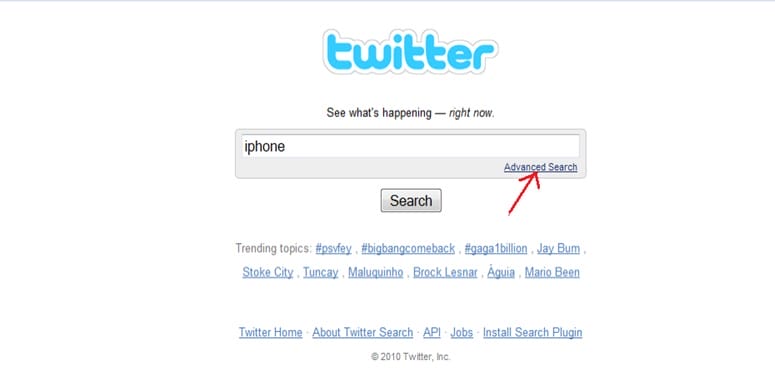
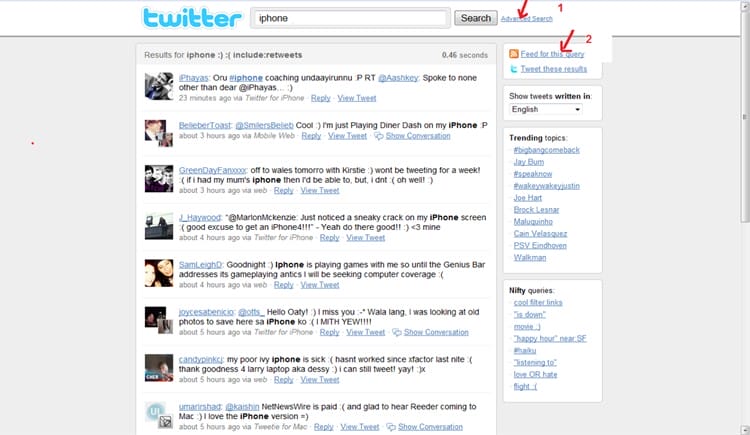
Using Twitter search, you can locate any instances of your name or your company name and tweet back (or you can choose to remain silent). When you see tweets with your name or your company name attached to them, you should use the “@” sign and the tweeter’s account name (e.g., @allensays) to respond accordingly. By taking an active role in responding, you start to build brand recognition and your audience feels that you care and are actively listening.
Click on ‘Advanced Search’ for more details on the search terms.
Step 3
Optional:
Under ‘People’: Select the person to receive the updates from.
Under ‘Places’ :Select the particular location such as the city or country to receive update from.
Under ‘Dates’: Indicate the start and end date on the search terms that you are searching for.
Step 4
Select both positive, negative reviews about the search terms.You can also select a question relating to the search term.
Not compulsory to fill up all the information except the ‘Search term’.
Result Page
Step 5
Click on “ RSS” icon to receive updates on your search term via your Google homepage or Google Reader.
You will need to have a Google account to see all the updates relating to your search term. You can sign up for either of Google’s services for eg. Gmail to obtain a Google account. You will also be able to receive alerts in your Gmail account as well.
FriendFeed is a social aggregator which gives you the ability to take all of your social accounts, such as YouTube, Delicious, Twitter, blog, and Flickr, and pull them together into a single (Friend) feed.
You can conduct searches on your brand throughout all social networks at once using this search engine. Aside from learning about the latest video or tweet related to your topic, you can analyse comments that people make under them.
Grab a FriendFeed widget (friendfeed.com/embed/widget) and display it on your Web site or blog, so people get a sense of your social media activity. Also, as you search and locate people who are talking about your brand on FriendFeed, respond to them through comments.
Under keyword, for our example, we use ‘ iphone’ and under words in the comments, key in ‘iphone’ to get updates onthe search query.
Step 2
View results of the search enquiry.
Step 3
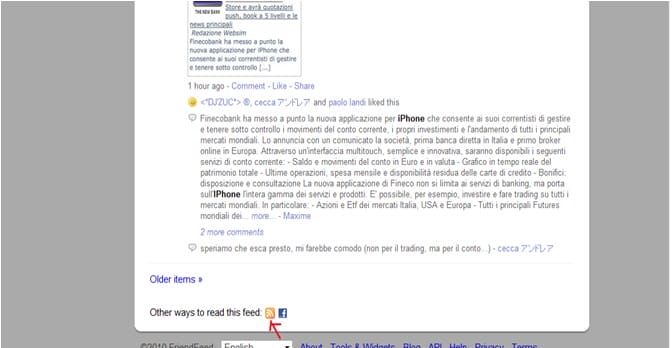
Click on the RSS icon to receive updates on search query.
Step 4
Select ‘Google’ to receive updates. Sign up for a Google account to view the news alert.You can sign up for the account via Gmail(www.gmail.com).
Step 5
To view the updates, you can select‘Google Homepage’ or ‘Google iReader’.
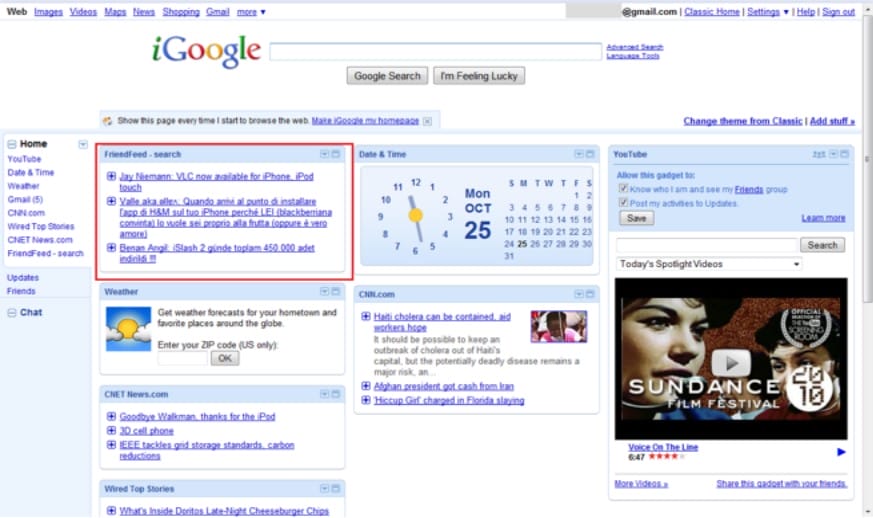
If you select to view the updates of the search query via Google Homepage, this is what you will see:
If you select Google Reader, this is what you will see:
Note: you will need to login to Google account first.
After signing in, you will be able to view the updates via the Google Reader (see image below).
So what exactly do you plan to monitor on the web with all six of these free tools?
It depends on your goals.
For example, is it to measure the success of your new viral marketing campaign?
Or is it to find out how consumers perceive your new service/product?
Here are some areas you may want to start monitoring:
Your name
Your business/company name
Your product brands
Popular company employees
Your trademarks and patents
Competitors
Campaigns
Current employees
Ex-employees
Future hires
Industry trends
Business partners
Unhappy clients or customers
Influencers
Critics
Bloggers
Journalists
Once you understand the power that consumers have today with the Internet, you will be wise enough to monitor your business’ reputation as well as devise strategy to deal with cases where your business’ name gets tarnished.
While this practical report does not serve to be an all-inclusive manual on the subject, hopefully it will arm you with enough advice to at least steer you in the right direction.
A word of warning…. if you aren’t taking care of your online reputation, others will.
It’s time to find out what people are saying—and do something about it. Marketing to your target market becomes seamless after you’ve done your homework using these tools.
While these are great resources, however, most local businesses are often small and do not have the staff resources to utilise these tools effectively, track their reputation as well as to effectively respond when necessary.
If this describes you, then do get in touch with us. Let us do the online monitoring for you and free you from all these time consuming and tedious work while you focus on growing your business.
Do not take your chance because online reputation management is necessary. Though tedious, monitoring can save you from a potential disaster when someone cites your name in a blog post that misrepresents you. Besides, it can also help you proactively join conversations around your topic area and get your business name out there.
Part of your brand is in the hands of others, so it’s critical that you monitor it.
If you need any help with this then contact us for an informal chat on how we can make sure that your reputation remains in good health.
“Know thy self, know thy enemy. A thousand battles, a thousand victories.“
There are many services to work with local businesses. The beauty is that once you have built a relationship with them then you can go back and add more and more services and products to them. If you did a good job the first time around then the likelihood of getting more business is high.
One thing for sure is that a lot of these companies need help. There is so much to do and even if they know what it is they need to do and maybe know how to do it, they rarely have the time to do it.
The best way is to start off with something that is low cost so there is a low barrier to entry. In other words, they will be happy to take the risk due to the small cost of the service that you are adding.
I would avoid offering SEO services to begin with, as they are sure to have had numerous emails, phone calls and hard mail sent to them. Once you have established a relationship and built trust then you will be well placed to offer advice and do the work for them.
One good way is to build a local business directory using open source software or a paid option, then add ALL local businesses for FREE, then start work to get the site ranking for the term “your town business directory” (if you can get the exact match domain this is relatively easy) Then approach all of these businesses and offer to upgrade them to the paid featured option. If you can demonstrate the directory is on the first page of google then it is not difficult to get them to cough up for a paid advert or featured post, especially if you only allow one or two paid adverts per category.
In the meantime there are plenty of other ways that you can help local business get ahead.
I would not get into reputation management until you really know your stuff. This can be a minefield to get right. Offer to help setup their review accounts or to get a few nice reviews for them. The problem is that if someone NEEDS reputation management, the chances are they have a fair few bad reviews and they will expect the Earth from you in 24 hours. This is NOT possible to do if they have had a few bad reviews over a few months. This takes some time to sort out, and know-how
Here are a just a few of the services that you can offer to do at low cost.
Setup a Facebook page
Edit their existing Facebook page for the new timeline
Create markup or micro-formats like Schema for their address and contact info. (really important for local search)
Add businesses to business directories like yell, local pages, yelp etc.
Setup a google+ page
Setup google places (or improve what they have)
Setup a customised twitter account
Create a pintrest account
Setup a personalised youtube channel
Create a QR code for them
Build them a website (wordpress or joomla)
Design leaflets or adverts for them (outsource to fiverr)
Facebook graph search
All of the above are relatively easy and quick to do so you can offer these services at an affordable price.
Some more involved services
Text message marketing campaign
PPC campaigns
Re-design website
Design leaflets and flyers (can be outsourced cheaply)
Reputation Management
Lead Generation
SEO Services
The most important thing is make sure you understand why the services you offer are needed by the local business and that you can do them properly. Forget the mantra ‘fake it, till you make it!’ You will get caught out and lose any credibility that you had and word will get around fast.
Another way to generate business is to offer a free seminar to show people how to improve their own reputation of build their own pages on google + or how to do SEO or, or , or. the list goes on.
People LOVE free.
There are 3 stages to building business when offering a service.
Tell them what they need to do – FREE
Teach them how to how to do it in more detail via video or written course
Then offer a full service to do it all for them
Lastly and maybe this should be at the top…. Before you offer any of these services make sure that not only can you do it, which I already covered but, that you also ENJOY doing it.. There is nothing like getting out of bed in the morning to do something that you really love to do. If you love to write or have a passion and real talent for design then offer services that will utilise all of your skills. Forget buying the next GREAT shiny WSO where you have to learn everything from scratch.
Just think, there is NO learning curve if you are offering services that you already know how to do!!!
I hope that gives you some food for thought. 🙂
We use cookies for various purposes, including analytics. By continuing to use the service, you agree to our use of cookies.